NOTIONA system for content creators

Every video, deal and payment, in one calm page.

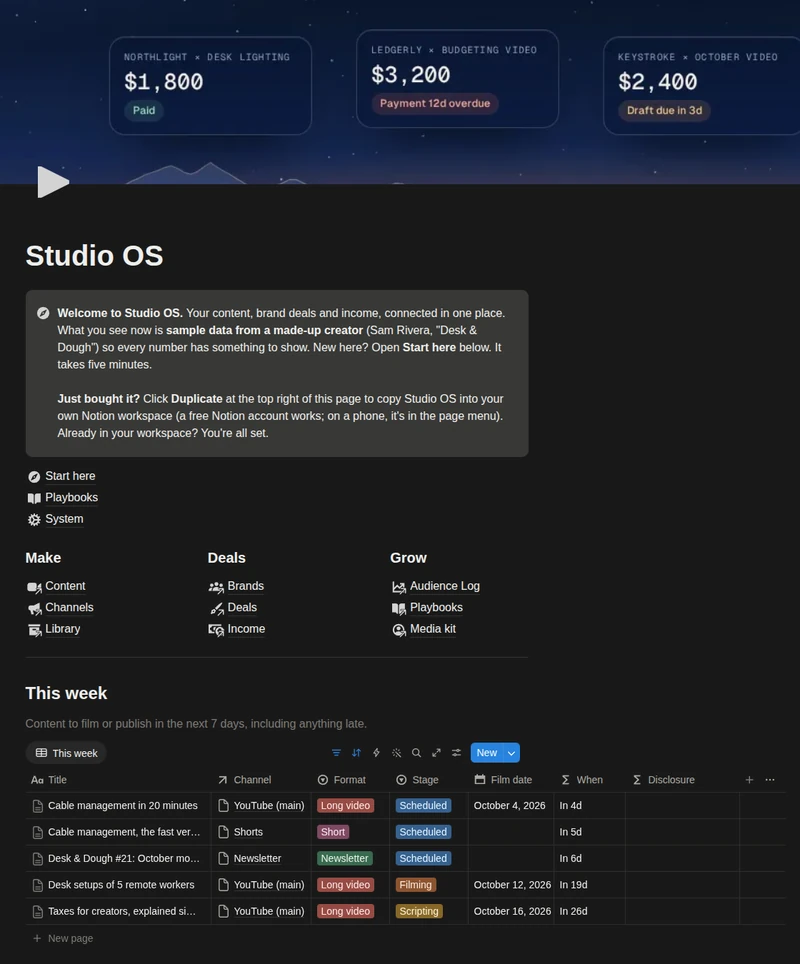
Plan your content, run your brand deals and log every payout in one Notion page. See what's due this week, which sponsor still owes you, and what each video really earned.

Notion Freeworks fullyInstantaccess by email14 daysmoney-back7 languagesall included
Sound familiar?

A content calendar in one app, sponsor emails in your inbox, invoices in PDFs and payouts spread over five dashboards.

When content and money live apart, deals slip. A draft runs late, a sponsor pays two months after go-live and nobody chases it, usage rights run on because no end date was written down, and nobody can say what a video actually earned.

Which sponsor still owes me? What's due this week? When do these usage rights end? Did I disclose that ad? What did that video actually earn?
One system

Content, deals and money. Connected.

Publish a piece, mark a payment paid, tick the formats you cut a video into. Earnings, deal progress and the lists on your home page update on their own.

What each piece really earned

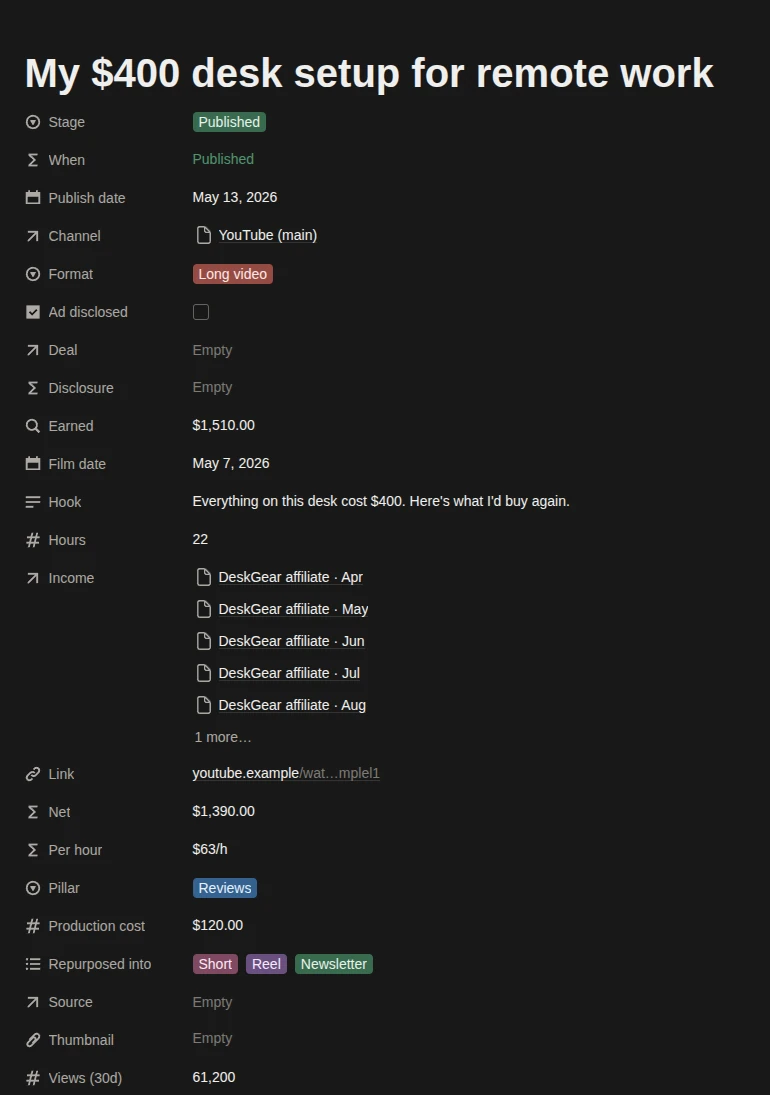
Link a payment to the piece it came from. Each piece adds up what it earned, takes off what it cost to make, and divides by your hours.

Sample: My $400 desk setup video
Earned$1,510
Production cost−$120
Hours22 h
Per hour$63/h

A deal radar that talks in plain words

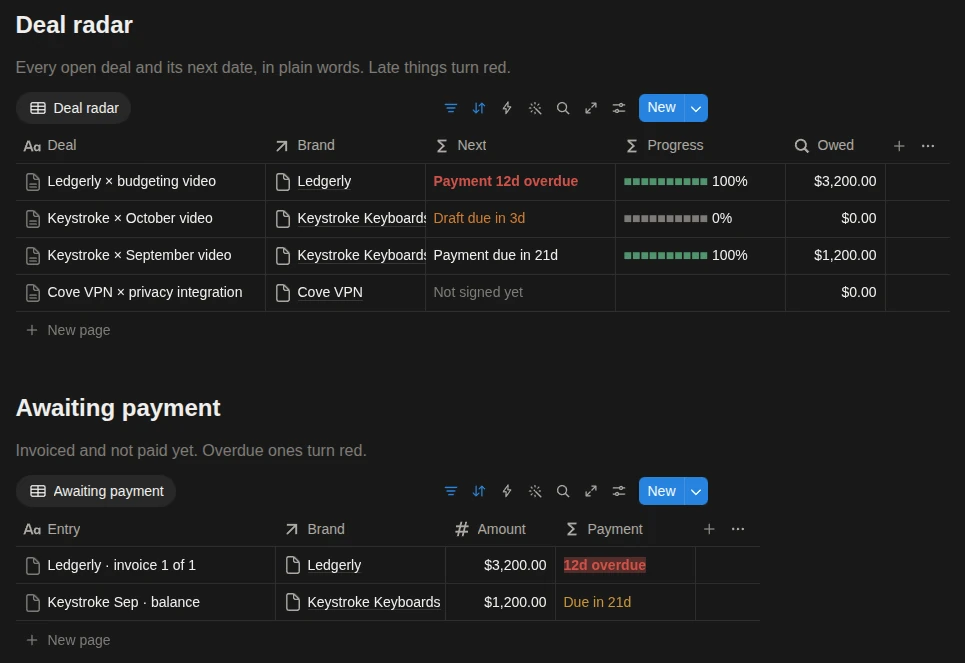
Every open deal shows its next date the way you'd say it. Late things turn red, and a deal with no end date for usage rights gets flagged.

Ledgerly × budgeting video$3,200 invoicedPayment 12d overdue
Keystroke × October videoIn productionDraft due in 3d
Keystroke × September video$1,200 still owedPayment due in 21d
Ledgerly × budgeting videoNo end date for usage rights

A repurpose queue

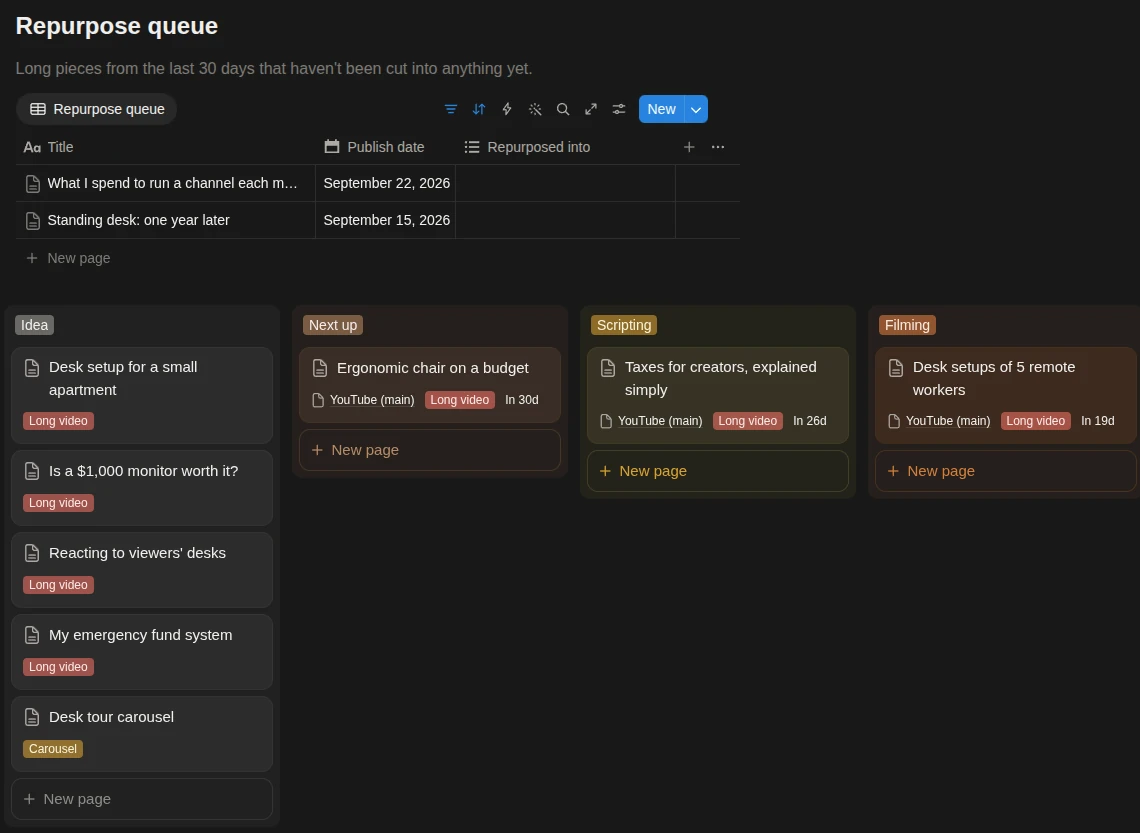
Long pieces from the last 30 days that you haven't cut into Shorts, Reels or a newsletter yet. Tick a format and the piece leaves the list.

What I spend to run a channel each monthNot cut yet
Standing desk: one year laterNot cut yet

Warnings that catch real mistakes

A sponsored piece that isn't marked as disclosed gets a red flag. Brands you planned to contact show up on your home page on the day.

Keystroke K3 sound testShort · sponsoredAdd ad disclosure
Orbit ChairsProspectFollow up today
Earned per piece

Know which videos pay the rent.

Sponsor fees, affiliate payouts and ad revenue you attribute all roll up into the piece they came from. Two videos with the same views can earn very different money, and now you can see it.

  • Earned, Net and Per hour on every piece
  • A What earned view ranks published pieces by net
  • Views after 30 days, next to the money
A published video in Studio OS: earned $1,510, production cost $120, net $1,390, 22 hours, $63 per hour
Deal radar

Every brand deal, with its next date in plain words.

Open deals are sorted by what comes next: a draft, a go-live, a payment, the end of usage rights. Each sponsor payment is its own row with terms and a due date, so overdue money can't hide.

  • Usage rights and exclusivity with end dates, and a warning when there is none
  • Awaiting payment: invoiced, not paid, overdue ones in red
  • A brands pipeline with follow-up reminders
Deal radar and Awaiting payment on the Studio OS home page
Content

From idea to published, then cut into more.

A pipeline board from Idea to Published, a calendar, and the repurpose queue. Each piece opens as a script page with a brief, hook options, an outline, a shot list and a publish checklist.

  • This week on your home page: what to film or publish in the next 7 days
  • Long videos, Shorts, Reels, TikToks, newsletters and podcasts in one pipeline
  • Channels with follower goals, and a monthly audience log
Repurpose queue and the content pipeline board in Studio OS
What's inside

A complete system, not a blank table.

It arrives filled with six months of sample data from a made-up creator, Sam Rivera of “Desk & Dough”, so every view has something to show. Clear it when you're ready.

7
Databases
Content, Channels, Audience Log, Brands, Deals and Income, connected, plus an optional Library
27
Ready-made views
Pipeline, calendar, deal radar, rights and exclusivity, what earned and more
5
Playbooks
Production checklist, repurpose map, brand deal checklist, pitch and rates, monthly review, plus a media kit page
10 min
Setup
A Start here guide walks you through it. Switching currency adds a few minutes.
Who it's for

Made for creators who run it like a business.

A good fit

Solo creators with a main channel (YouTube, a podcast or a newsletter), one to three short-form platforms, and money from more than one source: sponsors, ads, affiliates, your own products or memberships.

Not the right fit

Agencies and teams with approval chains, managers running many client accounts, or anyone who wants auto-posting or live analytics. Notion can't pull stats from your platforms.

How it works

Up and running before your coffee cools.

Buy once

Checkout takes a minute. You get the template link by email instantly.

Duplicate into Notion

One click copies Studio OS into your workspace. Free Notion accounts work.

Make it yours

Set your currency, rename the sample channels, clear the sample rows, then add your next three pieces and your current deals. The guide shows you how.

One-time purchase

Studio OS

$29USD, once

No subscription. Yours to keep and customize.

Get Studio OS

Secure checkout by Gumroad · Cards, PayPal, Apple Pay

Licensed for your own personal and business use. Please don't resell, share or give it away. Terms

  • 7 databases and 27 views
  • Home page with this week, pipeline, deal radar, income and follow-ups
  • A script page for every piece, with a publish checklist
  • 5 playbooks and a media kit page
  • Sample data and a 10-minute setup guide
  • All 7 languages included: English, Español, Português, العربية, Français, Deutsch, 日本語
  • Free updates to this version
  • Email support from the people who built it
14
14-day money-back guarantee. If it isn't right for you, email us within 14 days for a full refund. No forms, no hoops.
FAQ

Questions, answered.

Do I need a paid Notion plan?
No. Everything works on Notion's free plan. The template uses exactly one chart (Income by month). Notion Free allows one chart per workspace. If Freelancer OS already lives in the same workspace, the chart will ask you to upgrade; use the Income by month (table) view right below it.
Does it pull my YouTube or Instagram stats automatically?
No. Notion can't connect to your platforms. Once a month you type a few numbers per channel into the Audience Log (followers, views, watch time), and 30 days after a piece goes live you add its views. It takes about five minutes.
How do I get the template after buying?
Right after checkout you get an email with a link. Open it and click “Duplicate” in the top right to copy Studio OS into your Notion workspace.
Can I use my own currency?
Yes. Change the number format of the money fields to any currency Notion supports. The Start here guide shows exactly where.
I already use Freelancer OS. Do I need both?
No, Studio OS works on its own. If you do both kinds of work, keep sponsorships and content here and client service work (editing, consulting) in Freelancer OS. Both can live in the same workspace.
Is the brand deal checklist legal advice?
No. It is a list of questions to ask before you sign: deliverables, review rounds, usage rights, exclusivity, payment terms, late fees, disclosure. For a real contract question, ask a lawyer.
Can my editor or a team use it?
Yes, in a shared Notion workspace. It has no roles or approval steps built in; it's made for a solo creator, maybe with a part-time editor.
Which languages is it available in?
English, Español, Português (Brasil), العربية (Arabic, right-to-left), Français, Deutsch and 日本語. Each edition is fully translated: page names, properties, views, playbooks and sample data, with a local currency to start from. One purchase includes all 7; after purchase you get a link to each edition.
Does it work on my phone?
Yes. All views work in the Notion apps for iOS and Android.
What if it's not for me?

Email [email protected] within 14 days of purchase and we'll refund you in full.

Less time chasing deals and payouts, more time making things.

One-time purchaseWorks on Notion Free14-day refund